Home \ Blog \ 2026 \ September \ CD Burning

How to burn CDs | September 30th, 2026
Necessary items:- Computer/ Laptop (if you really don't have one I guess go to the library)
- CD Burning device (if not in the PC)
- Blank CD (either CD-R or CD-RW)
- CDBurderXP (the app)
The first thing that you're going to have to do is install CDBurnerXP, a software that will let you put .mp3's onto CDs.
Next, to download your favorite album, you're going to need to go to a website called Spotdown, a website that takes music off Spotify and lets you download each song individually. If you're trying to listen to your favorite niche soundcloud rapper, then this will not work for you, get your own tutorial.
I don't know if I have to write this but make sure that your blank CD is actually inside of your disc drive or CD player.
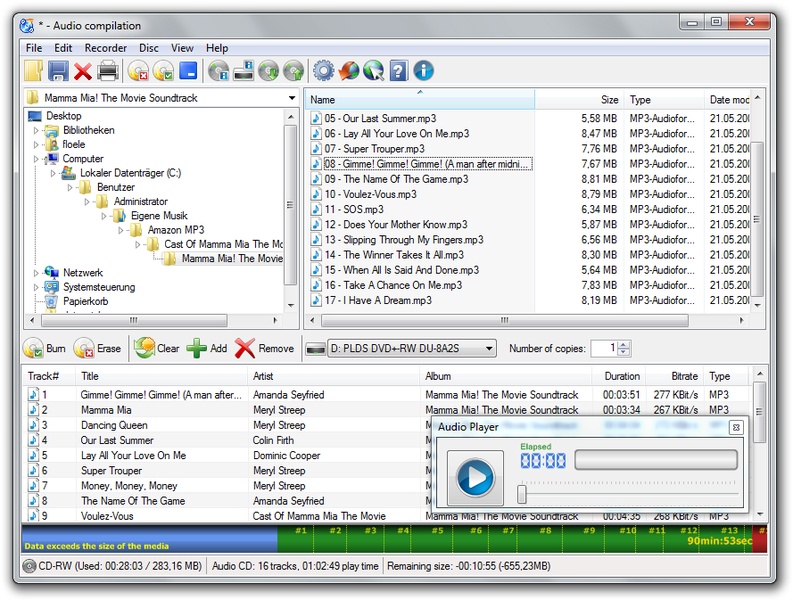
After you were hopefully able to download all of the songs you want as mp3s, you need to open CDBurnerXP. There will be a menu when you open that asks what you want to do with your CD. Make sure to select Audio Disc so that CD players like in a car can be able to read it.
(Click the image to view in full screen.)
On the bottom of the app, where you can see the tracks, is where you are going to drag your .mp3s at the very bottom you can see how much space your music is going to take up on your disc, you might have to remove some songs if the data limit is reached.
When you place in your songs, it is worth noting that they will automatically be placed in alphabetical order, I usually rename the song to have a numerical order, ex. (1song, 2song, 3song)
So now that you track list is sorted, you can click burn button and it will promt you to see if you want gaps inbetween each song, it really doesn't matter that much so do what you want there.